
How I Built an AI-Powered Documentation Gate Using GitHub Actions, Bun, and GPT-4.1 Mini
Every engineering team has the same dirty secret: documentation is always out of date.
You ship a new endpoint on Monday. The API reference still shows last month’s schema on Friday. Someone adds three environment variables but nobody touches the config docs. A new developer joins, reads the architecture guide, and builds a mental model that’s six sprints behind reality.
We all know the solution — “just update the docs when you change the code.” But humans are terrible at remembering, and code reviewers are terrible at catching it.
So I built a CI check that does it for them.
The Problem: Docs Drift
I maintain a Knowledge Base Management Dashboard — a full-stack app with a Bun/Hono backend, Next.js frontend, PostgreSQL, Qdrant vector database, and Redis. The codebase already has solid documentation: API reference, architecture guide, backend services, frontend pages, database schema, configuration. Six markdown files, all carefully maintained.
The problem wasn’t having docs — it was keeping them current. We already had rules in our AGENTS.md file:
- New API endpoint → update
api-reference.md - New service → update
backend.mdandarchitecture.md - Schema change → update
database-schema.md
Rules that everyone agreed with and nobody consistently followed.
The Idea: Make CI Enforce It
What if the CI pipeline could detect when you changed code that should trigger a doc update, and block the merge until you actually update the docs?
Not a linter. Not a reminder. A hard gate.
Here’s the flow I wanted:
- Developer opens a PR
- CI detects which code files changed and maps them to documentation files
- If the relevant docs weren’t updated → fail the CI and post a review comment with exactly what to do
- If docs were updated → use AI to verify the updates actually cover the changes
- Developer fixes the docs, pushes again → CI re-checks → repeat until it passes
Phase 1: The Suggestion Bot (and Why I Scrapped It)
My first attempt was gentler. I built a GitHub Actions workflow that would analyze PRs and suggest documentation updates as a regular PR comment. It used GPT-4.1 Mini to read the diffs, compare them against the current docs, and generate specific suggestions like “add this endpoint to api-reference.md.”
It worked. The suggestions were good. But nobody acted on them.
Turns out, optional suggestions in a PR comment are just noise. Developers read them, think “I’ll do that later,” and merge. The docs stay stale.
Lesson learned: if you want docs to stay current, you need a gate, not a suggestion.
Phase 2: The Docs Gate
The rewrite changed three things:
1. CI fails instead of suggesting. The workflow exits with code 1, which means the check shows as a red X. If your branch protection requires passing checks, the PR literally cannot merge.
2. It posts a REQUEST_CHANGES review, not a comment. GitHub review comments have a “Resolve conversation” button. They show up in the “Files changed” tab. They count as blocking reviews. You can’t ignore them the way you ignore a bot comment.
3. It generates a Cursor prompt, not doc content. Instead of the AI writing the docs (which produced mediocre results), it generates a prompt that the developer pastes into Cursor. Cursor has full IDE context — it reads the changed files, reads the existing docs, and updates them properly. The AI in CI just detects the gap; the AI in the IDE fixes it.
How It Works Under the Hood
The system has four TypeScript modules running on Bun:
File Classifier — A regex-based mapping from code paths to doc files. Routes map to the API reference. Services map to the backend docs. Schema changes map to the database docs. This is the cheapest possible detection — no AI needed, just pattern matching.
const FILE_TO_DOC_MAPPINGS = [
  {
    pattern: /^apps\/knowledgebase\/backend\/src\/routes\/.+\.ts$/,
    docs: ["docs/api-reference.md", "docs/backend.md"],
  },
  {
    pattern: /^apps\/knowledgebase\/backend\/src\/db\/schema\.ts$/,
    docs: ["docs/database-schema.md"],
  },
  // ... more mappings
];
LLM Verifier — When docs were updated, this module sends the code diffs + doc diffs to GPT-4.1 Mini and asks: “Do the documentation changes adequately cover the code changes?” It returns a pass/fail with specific gaps. This is a verification prompt, not a generation prompt — much cheaper and more reliable.
Cursor Prompt Builder — Generates a developer-friendly prompt that lists exactly which files to read and which docs to update. For incomplete docs, it includes the specific gaps the AI found. The prompt references the repo’s own AGENTS.md rules so Cursor follows the project’s conventions.
Main Orchestrator — Ties it all together with a decision tree:
No doc-relevant code changed         → Pass
Code changed, docs not touched       → Fail (no AI needed, free)
Code changed, docs touched           → AI verifies quality
  AI says complete                   → Pass, dismiss previous review
  AI says incomplete                 → Fail with specific gaps
The clever bit: when docs aren’t touched at all, the check fails without making any AI calls. It’s completely free. The AI only runs when docs were actually updated and need quality verification.
The Cost Profile
This was important to get right. Nobody wants a CI check that costs $5 per PR.
| PR scenario | Detection cost | Verification cost |
|---|---|---|
| No doc changes needed | Free | None |
| Docs not updated (most common failure) | Free | None |
| Docs updated, < 2000 lines | Free | 1 LLM call (~$0.01) |
| Docs updated, 2000-5000 lines | Free | N calls, chunked by doc |
| Mega PR > 5000 lines | Free | Skipped (file-touched check only) |
The typical case — a developer forgets to update docs — costs literally nothing. The AI only fires when there’s actual doc content to verify.
What the Developer Sees
When the check fails, the PR gets a review like this:
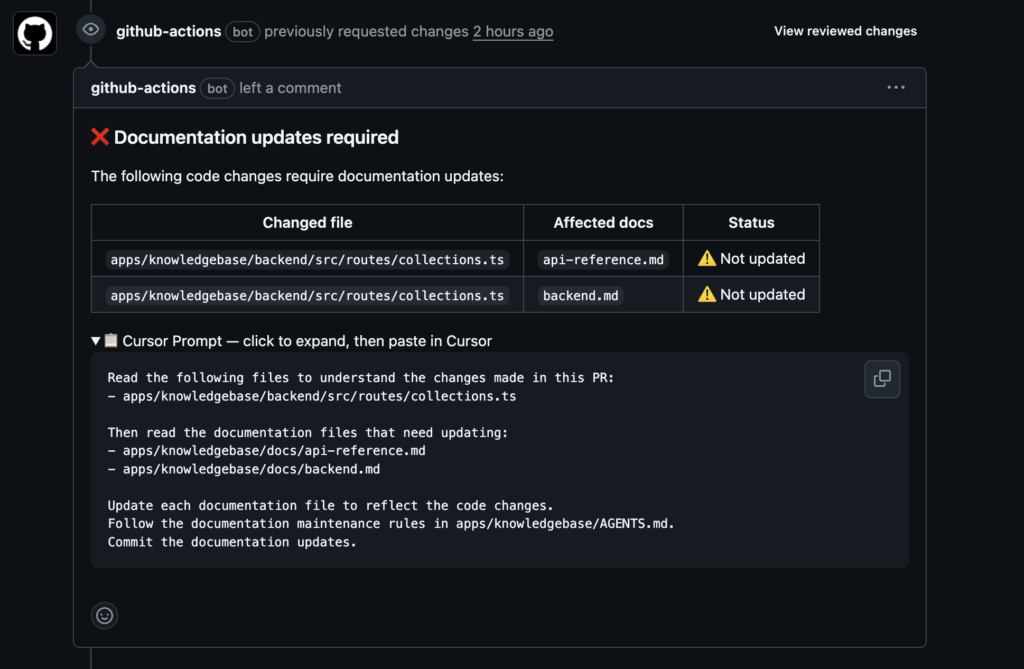
The developer expands the prompt, pastes it into Cursor, and Cursor does the rest. Push, and the CI re-runs.
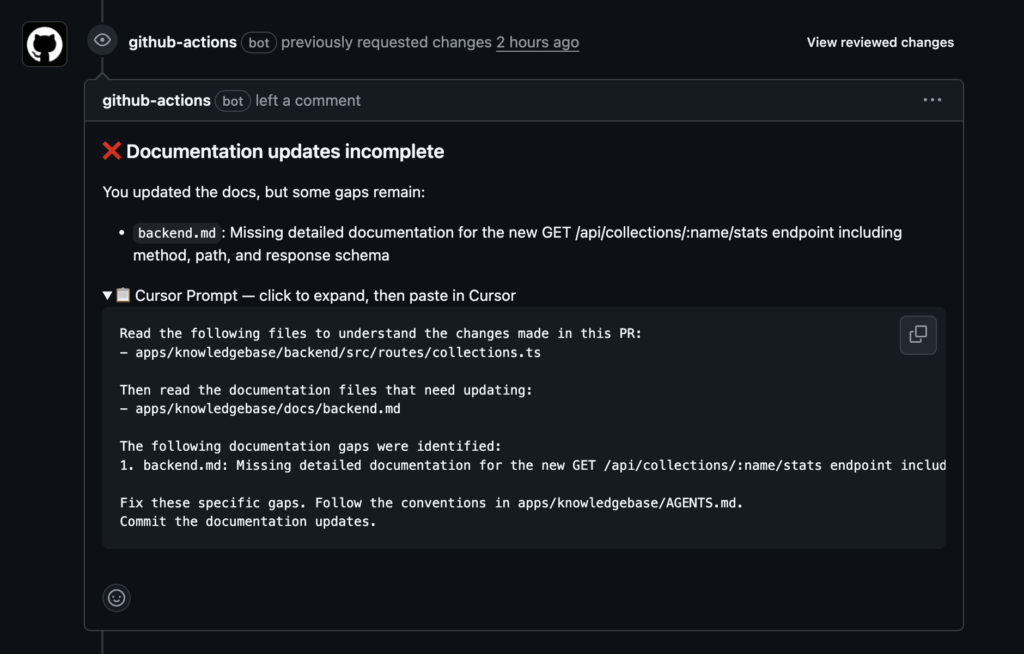
Until the docs are updated.
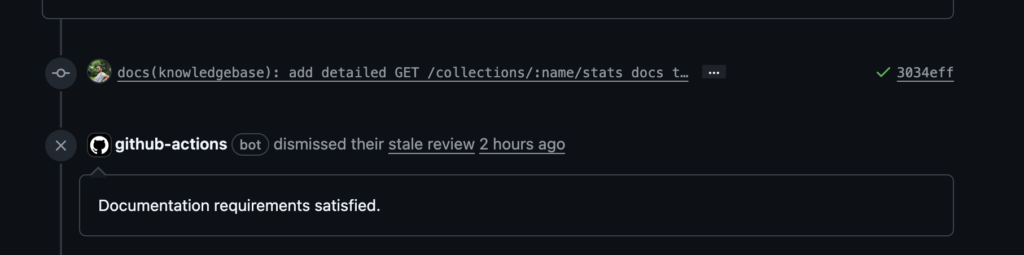
The GitHub Actions Workflow
The whole thing runs in a single job:
name: Docs Gate

on:
  pull_request:
    types: [opened, synchronize, reopened]
    branches: [main]

permissions:
  contents: read
  pull-requests: write

jobs:
  check-docs:
    name: Check documentation
    runs-on: ubuntu-latest
    steps:
      - uses: actions/checkout@v4
      - uses: oven-sh/setup-bun@v2
      - run: bun install --frozen-lockfile
        working-directory: .github/scripts
      - run: bun run docs-gate.ts
        working-directory: .github/scripts
        env:
          GITHUB_TOKEN: ${{ secrets.GITHUB_TOKEN }}
          OPENAI_API_KEY: ${{ secrets.OPENAI_API_KEY }}
          GITHUB_REPOSITORY: ${{ github.repository }}
          PR_NUMBER: ${{ github.event.pull_request.number }}
Setup: add OPENAI_API_KEY as a repo secret. That’s it. GITHUB_TOKEN is automatic.
What I’d Do Differently
Start with the gate, not the suggestion bot. I wasted a full iteration building a “nice” suggestion system that nobody used. The constraint (blocking merge) is what makes it work.
The file classifier is the most important piece. Get the regex mappings right and everything else follows. Get them wrong and developers will learn to ignore false positives.
Let the IDE AI write docs, not the CI AI. CI has limited context — just diffs and file contents. The IDE has the full codebase, language server, and developer intent. Use CI for detection, IDE for correction.
Try It Yourself
The entire implementation is open source. You can adapt it to any repo by:
- Writing a file classifier that matches your project’s code-to-docs mapping
- Pointing the Cursor prompt builder to your documentation conventions file
- Adding the workflow and an OpenAI API key
The code lives in .github/scripts/ — four TypeScript files, about 500 lines total, running on Bun.
If your team has the “docs are always out of date” problem, this fixes it. Not by generating docs for you, but by making it impossible to merge without them.
The complete source code is available on GitHub: sarvesh-ghl/docs-gate. Fork it, customize the file classifier for your project, add an OpenAI API key, and you’re done.
_If you’re interested in the implementation details or want to discuss adapting this for your stack, feel free to reach out._
Leave a Reply